Adobe Commerce or Shopify B2B for a distributor: a requirements-first comparison
Where each platform fits, measured against the B2B features distributors actually use.
Most platform comparisons start with feature checklists. Both Adobe Commerce and Shopify B2B now tick most of the boxes a distributor will write down, so checklists rarely settle the decision. A better approach is to start from your requirements, rank them, and ask how each platform meets the ones that matter most: natively, with configuration, with an app or extension, or with custom code.
This guide walks through the requirements we see in distributor projects and how the two platforms typically handle them. Platform capabilities change with every release, so treat this as a framework and verify the current details against each vendor’s documentation and your own proof of concept.
The platforms in one paragraph each
Adobe Commerce (formerly Magento Commerce) is a highly extensible platform with a dedicated B2B module. It can be hosted on Adobe’s cloud infrastructure or, depending on your license, managed by you or a partner. You get deep control over data models, checkout and integrations, and you take on the engineering and operational effort that comes with that control.
Shopify B2B is a set of business-to-business features inside Shopify’s hosted platform, available on Shopify Plus. Shopify runs the infrastructure, upgrades and checkout. You extend it through apps, its APIs and configuration within the limits Shopify defines.
Requirement by requirement
Company accounts and buyer roles
Both platforms model a customer company with multiple buyers. Adobe Commerce’s B2B module supports company structures with teams, roles and permissions, and purchase-order approval rules. Shopify B2B models companies with locations, and assigns buyers permissions per location.
Ask: How deep are your customers’ hierarchies? Do approvals depend on amount, cost center or product type? Map two or three of your most complex accounts onto each model before deciding.
Customer-specific pricing and catalogs
Adobe Commerce uses shared catalogs to control which products and prices each company sees. Shopify B2B assigns catalogs with price lists and quantity rules to company locations.
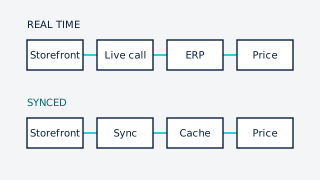
Both work well when pricing can be expressed as lists and tiers. Neither replicates a full ERP pricing engine. If your pricing depends on rules evaluated per order, you’ll need a real-time integration on either platform (see our guide on contract pricing).
Ask: How many distinct price lists would you need if you flattened your ERP rules? Is that number manageable?
Ordering workflows
Distributor buyers reorder more than they browse. Adobe Commerce’s B2B module includes quick order by SKU, CSV upload and requisition lists. On Shopify B2B, quick order and reorder patterns are available through theme features and apps, and quantity rules (minimums, increments) are native.
Ask: What share of your orders are repeat orders, and how do buyers place them today?
Quotes and negotiated deals
Adobe Commerce includes a negotiable quote workflow between buyer and sales rep. On Shopify, quoting is commonly handled with draft orders and apps.
Ask: Is quoting a core sales motion, or occasional? Who in your team owns it?
Payment terms
Both support selling on account. Shopify B2B has native payment terms (such as net terms) on company locations. Adobe Commerce supports payment on account and purchase orders in its B2B module. In both cases, credit limits and open balances usually live in the ERP, so plan for that integration.
Catalog depth and product data
Adobe Commerce handles large catalogs with rich attribute sets and complex configurable products natively. Shopify’s product model is simpler; deep attribute data is typically handled with metafields and a PIM.
Ask: How many SKUs and how many filterable attributes do you need? How many units of measure per product?
Integration with the ERP
Either platform can integrate with Acumatica or another ERP. The difference is where custom logic lives: inside the Adobe Commerce application, or in apps and middleware around Shopify. Both approaches work; they have different testing, hosting and ownership implications.
Total cost and team
Compare license or subscription, hosting, implementation, extensions or apps, and the ongoing engineering you’ll need to stay current. Adobe Commerce usually needs a stronger in-house or partner engineering function. Shopify reduces operational overhead but asks you to work within its constraints.
A practical way to decide
- List your top ten requirements and rank them with sales, customer service and finance in the room.
- Mark each as native, configurable, app/extension or custom on both platforms, with a link to the source.
- Prototype your hardest two. Usually pricing and the account structure of your largest customer.
- Estimate the five-year effort to run it, not only the launch budget.
Rules of thumb
- Shopify B2B tends to fit when your price model can be expressed as catalogs and price lists, your catalog is moderate, and you value speed to launch and low operational overhead.
- Adobe Commerce tends to fit when you need deep customization, very large or complex catalogs, multiple brands or regions on one install, or control over hosting and code.
Neither is the right answer by default. The right answer is the one that meets your top requirements with the least custom code you’ll have to maintain.
We work on both platforms, and we’ll tell you if neither is a good fit.